
What is new in the SNIP 3_19_00 release – released December 20th, 2025
(updating the prior release of 3_18_00 issued on May 13th, 2025).
This is the next production release of SNIP following the Rev 3_18 release. This release contains both major and minor improvements in response to user requests. This release supports both 32-bit and 64-bit installations on all Windows Platforms from Windows 7 to the current editions.
It is recommended that all Windows SNIP installations now update to using this release.
Changes in this release include
Raw TCP/IP Connections
An annoying bug which was introduced in the Rev 3.18 release for Raw TCP/IP connections has been corrected and removed. If you use Raw TCP/IP connections (typically only done when you need to support older Base Stations that do not speak NTRIP) and you are using a Rev 3.18 release of SNIP and your Caster sits behind a router to map the public / static IP to it; then you MUST update to overcome this problem. This bug manifests itself whenever the initial (and working) Raw TCP/IP connection is lost and then reconnects. In Rev 3.18, SNIP tries to open a socket on the public IP for the caster rather than on the local machine IP (the host machine IP). This fails to work and thereafter the data connection does not occur. Now, SNIP Rev 3.19 correctly uses the local machine IP at all times.
RINEX Processing
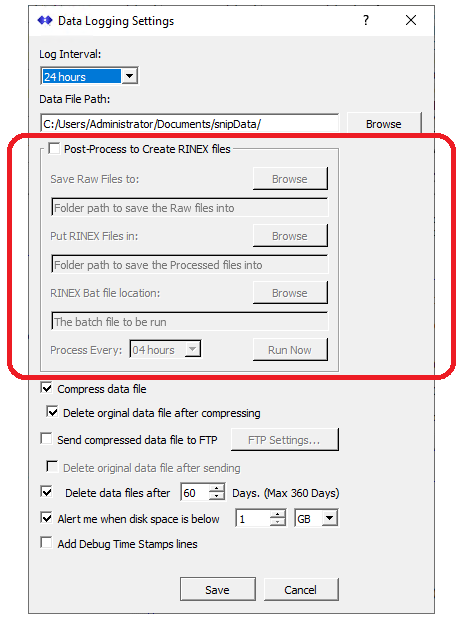
Additional functionality has been added to the data file saving sections of SNIP to allow automated processing of RINEX files from raw data files (typically RTCM 3.x messages) from a Base Station. These controls are part of the Data Logging dialog and are shown highlighted below. Caster operators can now set up working folders and files to hold RINEX data and performs RINEX conversions with the conversion tool of their choice. This article describes the new features in greater detail.
Caster Tables Updates and Caster Filtering
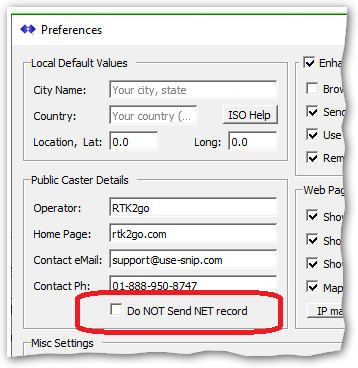
From an operator request to not share details about Caster ownership in the Caster Table, we have added a new control (in the Preferences dialog) This added a “Do NOT send NET record” checkbox to the caster details section. When checked, no NET records are sent in the Caster table. For most operators this function is not desired because they use the Public Caster Details to inform others regarding how to contact them.
In Web reports and some HTML pages, instances which were sending the incorrect castor and port in html caster title sections have been corrected.
In this release a massive rework of several Caster Table functions was undertaken in anticipation of support for JSON style Caster Tables (part of the newest revision of NTRIP now starting acceptance testing between NTRIP vendors in the RTCM SC-104 committee). Besides delivering a JSON table with rich filtering abilities, the new JSON format supports expressing the Coordinate Reference System (CRS) being used by each Base Station, expressing more complex service coverage areas (such as polygons), and being able to use UTF-8 for some text (so for example, Munich can be expressed as München, or as ミュンヘン if this is desired).
Support for Slow Data Streams
The logic for connections to support slow data streams (streams that only send new message content every few seconds) was improved and some processing problems were corrected. This type of stream is most commonly found with State Space Representations (SSR) messages where a new set of values may only be sent every 10~60 seconds or even slower. To learn more about SSR and it’s use with PPP and RTK, see this article. The slow logic has also been extended for use with data streams that are not treated as parsed RTCM3.

PFAT, Adding MT 1230
From an operator request to send out a “dummy” MT1230 messages (the GLONASS Inter-Frequency Phase Biases (IFPB) message) we have created a simple message that can be inserted after the Base Station antenna precise position message (MT1005 or MT1006). This is required by some GNSS devices similar to the way some devices will not achieve a fixed RTK state unless an empty MT1008 message is present.

The control has initially been added to the Translate Base Station details dialog, one of the PFAT translations. [Learn more about SNIP’s unique PFAT features in these articles]
More modern GNSS receiver designs zero this out automatically, and GLONASS itself has largely moved away from using multiple frequencies in favor of a direct sequence method similar to the GPS use of Gold codes. At this time we are not aware of any need to allow the SNIP operator to add any specific offset values in this message, please let us know if this is an actual requirement for your deployment.
Misc. Improvements
A small change in the console reports format was made to show the source IP of devices which connect to the SNIP Caster and then never send any data.
Some additional SSL/TLS error reporting logic has been added to assist with certificate use.
The SSL/TLS now supports using a passphrase / password for the secure key file used with secure Caster operations.
Minor improvements were made to general error reporting in NEAR streams (use the Verbose checkbox to see these in operation). Also, a new error message is shown in the console log whenever a shorter baseline (the distance between an NTRIP Client and the selected Base Station) is still too long to be used
An obscure bug in the NMEA sentence processing was corrected. Sentences not having a decimal point in the latitude – longitude fields of the $GGA sentence caused a bad decode value.
The disconnect process logic for Raw TCP/IP connections has been improved to always provide a cleaner socket disconnect when the connection is lost.
A new control was added (in the Preferences dialog allowing the operator to select when a Web Browser (or any non NTRIP Client connection) is allowed to request a Caster table. On busy Casters it can be desirable to only reply to valid NTRIP Client devices making such requests. The logic which was developed in prior releases of SNIP to detect and defeat various automated bots remains in place and is complementary with this.
How to Update…
Updates to SNIP are always free and easy. Your Caster will be offline about 3 minutes. From within SNIP, simply use the menu item Help ⇒ Check for Updates… Your update will be downloaded from our secure servers. Then you will be asked to allow SNIP to restart and update itself. On some Windows 10 and 11 systems you must also manually exit the current copy of SNIP to complete the update. It takes about three minutes to do and have your Caster back on-line. All your prior settings and user data details are preserved. That’s all there is to it!