
A new feature in the IP blocking dialog now allows adding selected entries (a User Account or email, a Base Station, or an IP) to a special list that will NEVER be sent any automated eMail when a problem is detected with that connection. Other routine email to that user (or base station owner) is not affected.
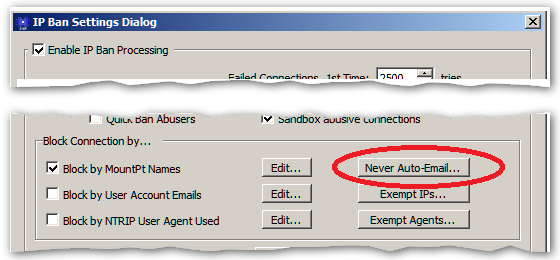
This is accessed with the Never Auto-Email… button in the IP Ban Setting dialog.
Using this feature requires both a Pro model of SNIP and the Email Plug-In. A dialog with a list of the entries as well as the number of times eMail was suppressed for each entry (and the last date this was done) is displayed.
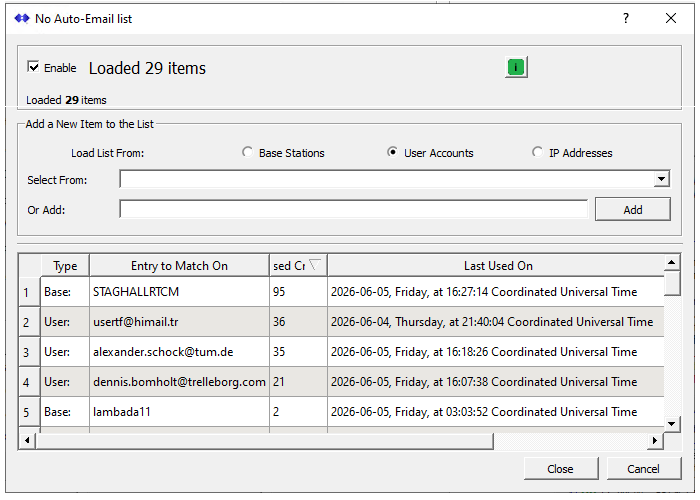
In the above image there are 29 entries, shown sorted by the number of times the function has been used. You can use this to decide when/if an entry should be removed (when abuse of your Caster has ceased) and to keep track of the worst offenders.
You can disable this function by un-checking the Enable checkbox.
You can add new items (Base Stations, User Accounts, or IPs) as needed using the middle section and the Ass button.
You can right-click on any entry to
- remove that entry, or
- to reset its count value, or
- to copy it to the clipboard.
Selecting one of the radio buttons will preload the combo box with entries of that type (unless there are hundreds of such entries making the list too large to display).
This is a powerful tool if you do not have full control over who your end users may be (typically a public Caster of some sort).
The use case for this feature is very narrow. Normally you would just block a User Account, a Base Station, or an IP from making a successful connection to the Caster in the other existing ways. But if the user has provided a bad email, or the IP which is being used constantly changes (from DCHP etc.), these other ways fail to fully address the problem and result in the SNIP operator getting annoying bounced emails.