
What is new in the SNIP 3_20_00 release – released June 5th, 2026
(updating the prior release of 3_19_00 issued on December 20th, 2025).
This is the next production release of SNIP following the Rev 3_19 release. This release contains both major and minor improvements in response to user requests. This release supports both 32-bit and 64-bit installations on all Windows Platforms from Windows 7 to the current editions.
This release contains 6 months of incremental improvements.
It is recommended that all Windows SNIP installations now update to using this release.
Changes in this release include
Push-Out stream connections
Major revisions were made to the logic that governs how Push-Out streams start and restart when the connection to the remote endpoint has been dropped. Deployments will no longer have to manually restart an active connection after a loss. This was occurring for some deployments at odd times.
Also added was additional data entry checking logic to detect and reject obvious incorrect IP or URL entries for the destination when the stream is created.
Not sending Automatic eMail to selected users
A new feature in the IP blocking dialog now allows adding selected entries (a User Account or email, a Base Station, or an IP) to a special list that will NEVER be sent any automated eMail when a problem is detected with that connection. Other routine email to that user (or base station owner) is not affected.
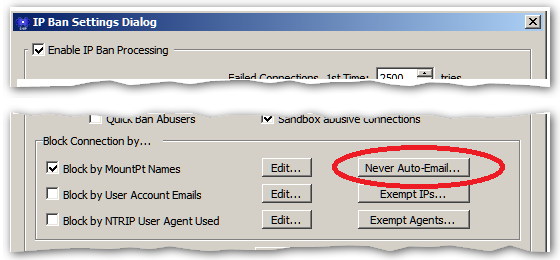
This is accessed with the Never Auto-Email… button in the IP Ban Setting dialog.
Using this feature requires both a Pro model of SNIP and the Email Plug-In. A dialog with a list of the entries as well as the number of times eMail was suppressed for each entry (and the last date this was done) is displayed.
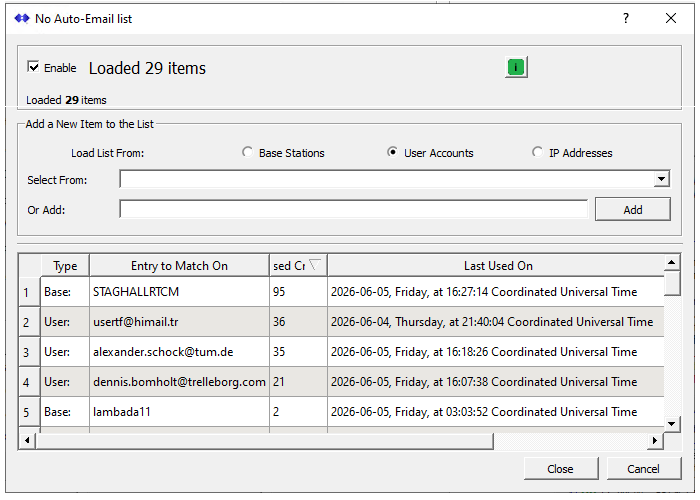
In the above image there are 29 entries, shown sorted by the number of times the function has been used. You can use this to decide when/if an entry should be removed (when abuse of your Caster has ceased) and to keep track of the worst offenders.
You can disable this function by un-checking the Enable checkbox. You can add new items (Base Stations, User Accounts, or IPs) as needed. Right-click to remove an entry. Selecting one of the radio buttons will preload the combo box with entries of that type (unless there are hundreds of such entries making the list too large to display). This is a powerful tool if you do not have full control over who your end users may be (typically a public Caster of some sort).
The use case for this feature is very narrow. Normally you would just block a User Account, a Base Station, or an IP from making a successful connection to the Caster in the other existing ways. But if the user has provided a bad email, or the IP which is being used constantly changes (from DCHP etc.), these other ways fail to fully address the problem and result in the SNIP operator getting annoying bounced emails.
Raw TCP/IP Connections
A minor naming problem was found and resolved. During times when a raw TCP/IP connection has been “half disconnected” (one side of the connection has dropped the connection while the other side still thinks it is connected) the reconnecting in-bound connection was being renamed with “-“ appended to the name. In prior release the text “-02” was being appended, and this was a side effect of not fully resolving that. Now presumed to be completed resolved.
NEAR Streams
The allowed baseline distance for an NTRIP Rover device connecting to a NEAR stream Base Station can now be increased from the prior limit of 300 km to 1000 km. In a similar way, the maximum span to average over can now be increased from 1000 km to be 3000 km. This increase was requested by a deployment with an odd use case. As a general rule, baselines over ~60 km are rarely of any use in traditional RTK applications.
The new functionality is reached (in the NEAR stream setup dialog by clicking on one of the buttons market Km, the button text will change to “Km expanded” and the larger values can then be entered. This article explains the function in more depth.
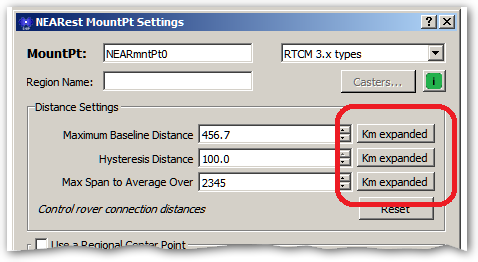
These values are saved when the dialog is saved. If the Km expanded button is checked, and if the current values are larger than the Km setting will allow, they are reduced to the largest allowed value.
RTCM3.x Decoding
Support for decoding and displaying NavIC MSM messages (The Indian GNSS system) has been added.
Support for decoding and displaying QZSS MSM messages (the Japanese GNSS system) has been improved.
Some users are now deploying GNSS Base stations that track the NavIC MSM messages and this trend is expected to grow. However this can be a major problem for older GNSS systems that do not process these messages.
In the official order in which sets of MSM messages are sent by RTCM3.x, the NavIC MSM messages is the last one to be sent. Hence, it asserts the “we are done” flag used to signal that a complete set of MSM messages has been delivered (the prior MSM messages in the same will set this flag as ‘more data is coming’ – see DF393 in the actual std). If a rover device does not decode the NavIC MSM messages it will NEVER see the we are done flag set and will never run its navigation filter. And some GNSS base station developers will send an empty NavIC MSM messages just to set this flag (wasteful but allowed by the current RTCM standards). This is already proving to be a problem for some older rover devices that do not decode the NavIC messages. We may add a PFAT transformation to address this in the future if needed.
Recording Raw NTRIP Rover user data
The ability to record raw data streams from any connected NTRIP Client (rover) device has been added. See this article for more details. This control is found as a new tab in the User Account Restrictions dialog.
This ability allows using the rover connection to have the SNIP Caster capture whatever data from the field is wanted. You are not limited to NMEA sentences, but can send back any binary format you wish for any post processing you wish. Crop harvesting data or vehicle performance telemetry are typical examples of such a use.
Misc. Changes
- Additional details about active user restrictions have been added to the User Account report.
- An unused button pertaining to base station clock alignment in the PFAT transformation dialog was removed.
How to Update…
Updates to SNIP are always free and easy. Your Caster will be offline about 3 minutes. From within SNIP, simply use the menu item Help ⇒ Check for Updates… Your update will be downloaded from our secure servers. Then you will be asked to allow SNIP to restart and update itself. On some Windows 10 and 11 systems you must also manually exit the current copy of SNIP to complete the update. It takes about three minutes to do and have your Caster back on-line. All your prior settings and user data details are preserved. That’s all there is to it!