
From Rev 3.20 onward SNIP now has two new convenience buttons to Import and to Export Push-Out data stream settings. This feature is mostly of interest to deployments that run multiple redundant SNIP NTRIP Casters that need to be kept in sync when Base Stations change. A typical deployment might have one Caster operating on a private network available to users within a corporate run firewall, and another available on the public IP available to a wider group of user such a vendors and support staff.
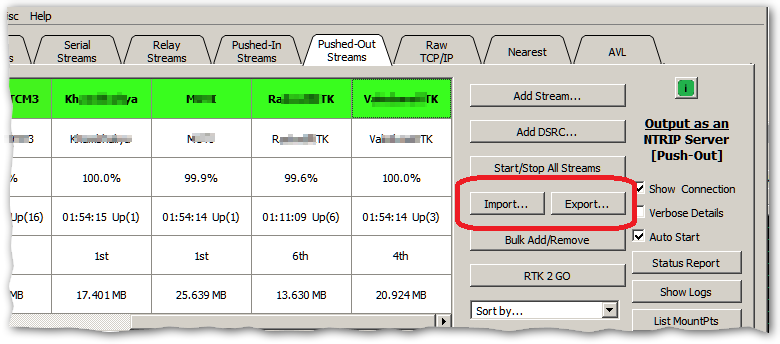
This feature is implemented as two new buttons found on the Push-Out tab and shown in the image below. While the general use case of Push-Out streams is to connect to another remote NTRIP Caster (and using the NTRIP protocol), it should be noted that this feature can be used to connect to any remote TCP/IP socket. This can be of value when sending a data stream to non-NTRIP end points.
Exporting
The current set of Push-Out streams can be exported into a date and time stamped file by pressing the Export button. The export takes only a moment and the console log will display the results and inform you where the output file was placed, for example:
Exporting a list of all Push-Out slots to an external text file.
Hint: Use this file to import the list to another NTRIP Caster machine.
Exporting 1 of 9...
Saving 9 entries to file....
File (1,984 bytes) written to C:/Program Files (x86)/SNIP/bin/data/PushOutData_KEY_2026_06_04_13_47_28.txt
In the above fragment the text KEY is replaced by the last five digits of the license key (if present). This provided a method to tell what instance of SNIP the file came from. And the text “2026_06_04_13_47_28” should be read as June 4th 2026 at 13:47:28 in the local time zone.
The file itself is made up of simple text which any text editor can edit. The entries are a sequence of simple repeating patterns with the key settings for each Push-Out stream. A typical entry is shown below.
### Push-Out Entry 3 of 9
Source: AZU1_RTCM3
Sent_As: foo
Sent_To: 001.xxx.yyy.zzz
Sent_To_Port: 2101
User_Account:
Password: bm9uZTEw
Use_Rev2: false
Use_SSL: false
Slip_Ok: false
All comment lines start with “#’ (## is used for the file headers while ### starts each new entry). Each line is terminated with a line feed. The order of entries in the export is not material and may be changed if needed (such as when merging files). The numbering used is simply informative. The order (and numbering) is ignored on import. The password field is base64 encoded, everything else is in plain text.
Importing
Import is, by contrast, a considerably more complex process. The selected source file must be parsed and then checked for internal consistencies and for potential conflicts with any currently loaded Push-In streams. The SNIP operator is given a few dialog choices when any conflicts are found to either abort or proceed. As with any major change to the Caster settings, it is wise to make a full back up before proceeding (found at Menu: Misc ⇒ Back-Up… ⇒ Back-Up Now).
After pressing Import, the first step of the process is to select the import file to be used. A standard file dialog is presented and the user selects the *.txt file to be processed (or cancels). As the process proceeds the console log shows progress and status. And a list of any problems that are found is added to the console log. A progress bar is shown as each of the consistency checking stages is performed. In a file with no detected issues a display like the below will be shown:
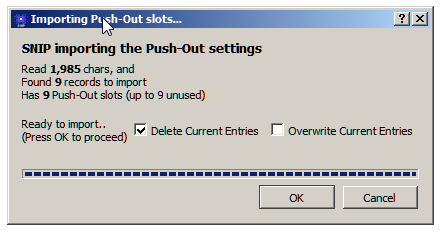
The dialog box lists four critical bits of information you should review.
- How large the selected file was in bytes/chars, does this match expectations?
- How many records were found in the file, does this match expectations?
- How many Push-In slots SNIP CURRENTLY has loaded
- And How many unused slots exist, is there sufficient room?
These values should be examined to confirm that they meet your expectations before proceeding.
In this case we are importing the file we created a moment ago, so seeing that there are 9 records and also 9 existing Push-Out slots already loaded is to be expected. And in this case we want to overwrite the existing entries, so SNIP has provided a pre-checked option to that effect.
[Aside: If this were NOT checked, the entries would be appended, resulting in 18 entries with nine sets of two entries sending the same data to the same remote endpoint. Almost certainly a problem and only of value if you plan to hand edit the entries to remove the conflicts before use. If that is your plan, it is perhaps easier to first export the combined set and edit this down in a text editor and then do a clean import with the edited results.]
Some operators prefer to delete all existing Push-In slots before importing the file; others let SNIP do it. There is no intrinsic advantage to either.
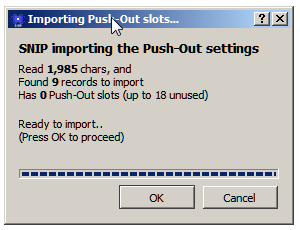
If there were no existing Push-In entries, the presented dialog is somewhat simpler, and the operator is simply asked to confirm before the import occurs.
If you proceed with the import you will see a console entry similar to:
Importing Push-Out settings was completed, loaded 9 records, 9 in total
If the existing Push-In slots are active and part of a NEAR stream or in use by NTRIP Clients, you will see the above line preceded with a number of warning messages that a given Push-In stream was removed from a NEAR stream or otherwise dropped. Once the new stream is re-started these things quickly sort themselves out, but consideration should be given to any active end users you may disrupt. Note that user disruptions may also occur on the remote NTRIP Casters that these streams are being sent to during the period when the stream is removed and then added back.
General Remarks
This is a rather specialized set of features for deployments that make extensive use of Push-Out streams, which is itself not the most common type of SNIP stream.
It was created in part because all the Push-In settings reside in the general simpleNTRIP.ini file which we do not recommend you hand edit or attempt to change. [NEVER do this when SNIP is active.] In this respects it differs from external files such as “reservations” (which holds Push-In reservations) or NtripUserAccounts.ini or NtripCustomerAccounts.ini (which hold the details of User Accounts and Customer Accounts respectively).
Aside: There are also similar Export and Import functions for the User Accounts. See this article for further details of their use. This feature has value when importing a large number of new User Accounts from another source.
Note that for larger SNIP deployments (those with 75 or more streams), the way in which Push-Out streams / slots is counted differs. On such deployments, each new Push-Out stream is counted as ½ a slot to effectively increase the number of Push-Out streams the deployment can support. See this article for details.